Category: Uncategorized

  • Tableau Consulting Services: 14 Practical Reasons Businesses Invest (and See ROI Faster)


    You don’t need another dashboard.
     You need clarity that leads to action.

    That’s exactly where Tableau consulting experts make the difference. Many companies adopt Tableau expecting instant insights, but end up with scattered reports, slow performance, and inconsistent metrics. The tool isn’t the problem — the approach is.

    Without the right strategy, even powerful platforms fail to deliver business value.


    Why Businesses Struggle Even After Adopting Tableau

    Most teams jump straight into Tableau dashboard services without defining what success looks like. They build visuals before aligning on KPIs, connect data without cleaning it, and scale dashboards without structure.

    The result?

    – Reports that don’t match across teams
     — Slow dashboards that frustrate users
     — Confusing calculations no one wants to touch
     — Decision-making delays despite “having data”

    This is where business intelligence consulting becomes essential — not for building more dashboards, but for building the right ones.


    14 Reasons to Invest in Tableau Consulting

    1. Handle Growing Data Without Chaos

    With Tableau data integration, businesses can unify multiple data sources into a single, reliable system.

    2. Turn Raw Data Into Visual Clarity

    Strong data visualization services simplify complex datasets into insights anyone can understand.

    3. Build User-Friendly Dashboards

    Through interactive Tableau dashboards, even non-technical teams can explore data confidently.

    4. Improve Performance at Scale

    Experts ensure faster load times with Tableau Server Optimization, avoiding lag and crashes.

    5. Create Consistent Business Logic

    A structured approach ensures all reports align using custom Tableau reports and shared definitions.

    6. Enable Advanced Calculations

    A Tableau LOD Calculation Expert helps build precise, scalable calculations for deeper insights.

    7. Support Financial Decision-Making

    With Tableau for Finance Dashboards, leadership teams gain clarity on revenue, cost, and profitability.

    8. Automate Reporting Workflows

    Using Tableau automation services, teams reduce manual effort and reporting delays.

    9. Improve Data Exploration

    Flexible filtering and slicing in Tableau KPI dashboards help uncover trends quickly.

    10. Accelerate Data Processing

    With optimized pipelines and analytics and reporting consulting, insights arrive faster.

    11. Enhance Team Collaboration

    Centralized dashboards improve alignment across departments.

    12. Access Enterprise-Level Capabilities

    Through enterprise Tableau solutions, businesses scale analytics without breaking systems.

    13. Customize Visual Experience

    High-quality design through Pixel-Perfect Tableau Visuals improves usability and adoption.

    14. Build a Long-Term Data Strategy

    With analytics strategy services, Tableau becomes more than a tool — it becomes a decision engine.


    From Dashboards to Decision Systems

    The real value of Tableau isn’t in charts — it’s in decisions.

    When implemented correctly, Tableau supports data-driven decision making by aligning metrics, improving trust, and reducing delays. Instead of reacting to reports, teams act on insights in real time.

    This shift turns dashboards into decision-ready data visualization systems that drive measurable outcomes.


    The Foundation Most Teams Skip

    Here’s the uncomfortable truth:

    Even the best dashboards fail without structure.

    Without a Unified Reporting Data Model, businesses face inconsistent metrics. Without clean pipelines, insights are delayed. Without alignment, dashboards become noise.

    That’s why successful implementations focus on:

    – Clean data architecture
     — Defined KPIs
     — Scalable models
     — Clear visualization strategy

    This is the difference between dashboards people look at… and dashboards people actually use.


    Building for Scale, Not Just Speed

    Many teams want quick results. But speed without structure leads to rework.

    With the right approach, businesses can combine:

    Tableau consulting experts for strategy
     — custom analytics solutions for flexibility
     — interactive Tableau dashboards for usability

    This creates systems that grow with the business instead of breaking under pressure.


    What ROI Actually Looks Like

    When Tableau is implemented correctly, results show up fast:

    – Faster reporting cycles
     — Reduced manual work
     — Improved decision speed
     — Higher data trust across teams

    This is what ROI-driven reporting solutions are meant to deliver — not just insights, but impact.


    Final Thought

    Tableau is powerful. But power without direction creates complexity.

    The real advantage comes from knowing what to build, how to structure it, and how to scale it.

    At visualizexpert.com, the focus is on helping businesses move from scattered dashboards to structured, decision-driven analytics systems.

    Because in the end, success doesn’t come from having more data — 
     It comes from making better decisions with it.
  • Power BI Dashboard Development: Why AI Features Only Work With the Right Foundation


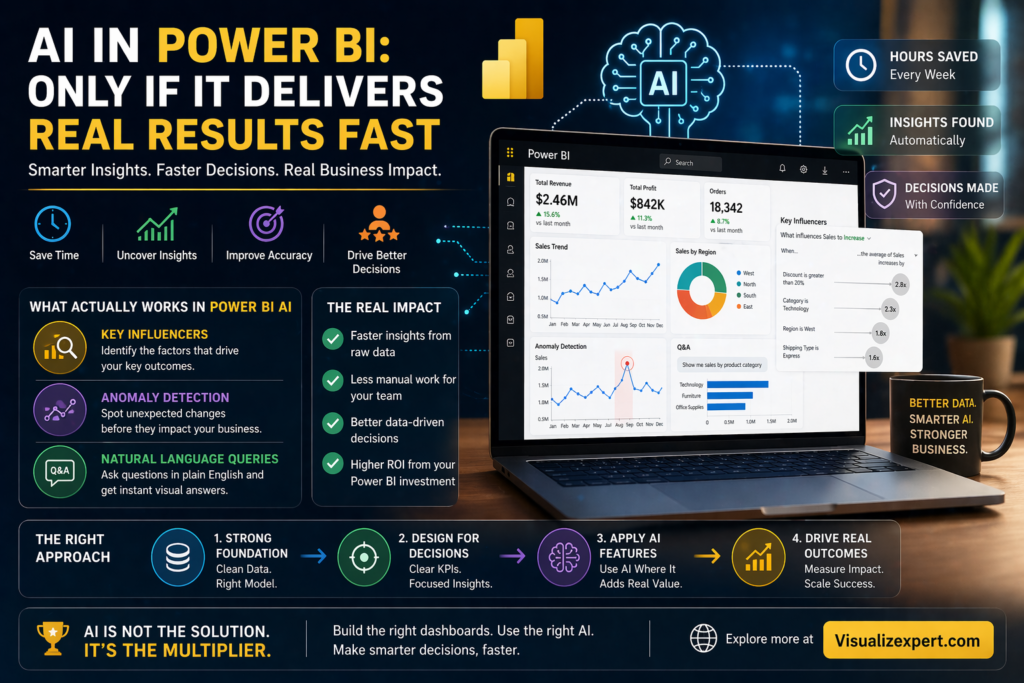
    AI in Power BI sounds like a breakthrough — and in many ways, it is. But without the right Power BI Dashboard Development approach, even the smartest AI features end up as unused add-ons.

    Most teams don’t struggle because AI is missing.
     They struggle because AI is layered on top of dashboards that were never built for decisions.

    You might already have dashboards.
     You might even be using AI visuals.

    But if insights still feel slow, confusing, or unreliable — the issue isn’t the tool.

    It’s how everything is structured underneath.


    The Illusion of “Smart” Dashboards

    AI features in Power BI promise speed:

    • Automatic insights
    • Pattern detection
    • Natural language queries
    • Predictive analytics

    On paper, it sounds like everything a modern business needs.

    And during demos, it works beautifully.

    But real-world data isn’t clean or consistent.

    So what happens?

    • AI highlights the wrong trends
    • Insights don’t match business expectations
    • Teams lose trust in outputs
    • Dashboards get ignored

    The problem isn’t that AI is ineffective.
     It’s that AI depends entirely on the quality of your data and dashboards.


    Why Most AI Features Fail in Practice

    AI doesn’t think like your business.

    It doesn’t understand:

    • What “revenue” actually means in your organization
    • Which KPIs matter most
    • How different systems define the same metric
    • What context decision-makers need

    It simply processes what it’s given.

    If your data is inconsistent, your AI output will be too.

    That’s why many businesses end up in a frustrating loop:

    You add AI → Results feel off → You stop trusting it → Adoption drops

    And suddenly, a powerful feature becomes just another unused tool.


    The Real Role of Power BI Dashboard Development

    Good dashboards don’t just display data.
     They create clarity.

    That’s what strong Power BI Dashboard Development focuses on:

    • Structuring data correctly
    • Defining clear KPIs
    • Aligning metrics across teams
    • Designing for decisions, not just visuals

    AI works best when these fundamentals are already in place.

    Without them, it’s just guessing.


    AI Is Only as Good as Your Data Model

    This is where most teams underestimate the problem.

    Behind every effective dashboard is a solid data model.

    If your model has:

    • Duplicate fields
    • Broken relationships
    • Inconsistent definitions
    • Poor naming conventions

    AI features will amplify the confusion instead of solving it.

    For example:

    An anomaly detection visual might flag a spike in revenue.
     But if “revenue” is defined differently across sources, the insight becomes meaningless.

    This is why many dashboards look advanced but fail to deliver value.


    What Actually Works in Power BI AI

    Not all AI features are hype.

    Some genuinely deliver results — when used correctly.

    1. Key Influencers Visual

    Identifies what drives outcomes and ranks the most impactful factors automatically.

    2. Anomaly Detection

    Flags unusual patterns so teams focus on what actually needs attention.

    3. Natural Language Queries (Q&A)

    Lets users ask questions in plain English and get instant visual answers.

    But here’s the catch:

    These features only work when your data is structured properly.


    Where Businesses Get It Wrong

    Most teams approach AI like this:

    1. Build dashboards quickly
    2. Add AI features later
    3. Expect instant transformation

    This rarely works.

    Because AI is not a shortcut.

    It’s an accelerator.

    And acceleration only works when direction is already clear.


    The Right Approach: Build First, Then Enhance

    To make AI actually useful, the order matters.

    Step 1: Fix the Foundation

    • Clean your data
    • Align KPI definitions
    • Build a consistent model
    • Remove redundancies

    Step 2: Design for Decisions

    • Focus on key business questions
    • Highlight actionable insights
    • Reduce visual clutter

    Step 3: Add AI Features

    • Use AI where it saves time
    • Avoid overloading dashboards
    • Focus on real use cases

    Now AI becomes valuable — not overwhelming.


    The Speed Advantage of Doing It Right

    When AI is implemented correctly:

    • Analysts save hours on manual work
    • Business users get faster answers
    • Decisions happen quicker
    • Reporting cycles shrink

    Instead of reacting to data, teams start acting on it.


    Final Thought: AI Works Only When Your Foundation Is Strong

    AI won’t fix broken dashboards.
     It won’t clean messy data.
     It won’t define your business logic.

    But when everything is structured correctly — 
     AI becomes a powerful multiplier.

    If your dashboards feel complex, slow, or underused, it’s time to fix the foundation first.

    👉 Explore how Visualizexpert.com can help you build decision-driven dashboards that actually deliver results.

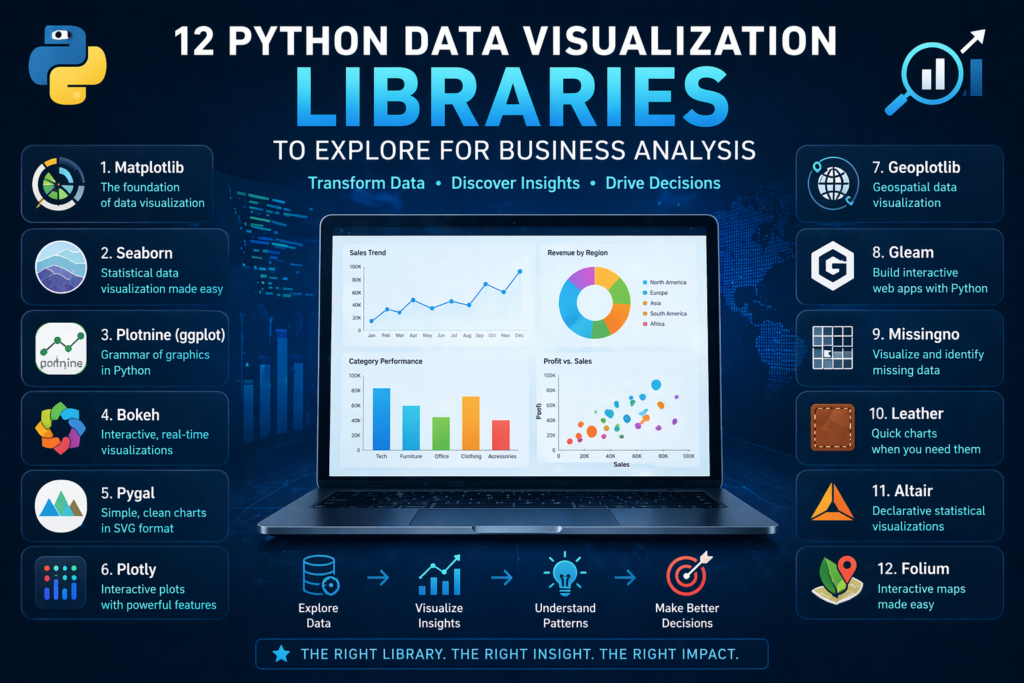
  • Data Visualization Services: 12 Python Libraries Every Business Analyst Should Know


    Most companies invest in data analytics services, collect massive datasets, and still struggle to answer simple business questions. Reports pile up. Dashboards multiply. But decisions? Still slow.

    That’s where data visualization services change the equation.

    Instead of drowning in spreadsheets, the right visualization approach — powered by Python — helps teams see patterns, spot risks, and act faster. But not all tools are created equal.

    Let’s break down 12 powerful Python libraries and, more importantly, how they actually fit into real business decision-making.


    Why Visualization Matters More Than Ever

    Raw data doesn’t drive outcomes.
     Data visualization for decision making does.

    Without clear visuals:

    • Teams misinterpret metrics
    • Leaders delay decisions
    • Opportunities slip through

    Modern businesses rely on interactive business dashboards and executive analytics dashboards to stay competitive. But behind every great dashboard is a strong visualization layer.

    Python libraries play a key role here — especially when paired with custom analytics solutions and scalable BI systems.


    1. Matplotlib: The Foundation Layer

    Matplotlib is where most data journeys begin.

    It’s powerful, flexible, and widely used in analytics and reporting consulting. But it’s not built for speed or aesthetics.

    Use it when:

    • You need full control over charts
    • You’re building base-level visuals
    • You’re supporting Power BI data modeling workflows

    Think of it as infrastructure — not the final product.


    2. Seaborn: Better Visuals, Less Effort

    Seaborn builds on Matplotlib but adds clarity.

    It simplifies complex datasets and creates cleaner visuals, making it ideal for:

    • Trend analysis
    • Statistical insights
    • Early-stage KPI dashboard services

    For businesses, this means faster interpretation without heavy customization.


    3. Plotly: Interactive and Business-Ready

    Plotly brings interactivity to life.

    It’s widely used in interactive dashboard design and real-time data dashboards because it allows users to:

    • Hover for insights
    • Filter data dynamically
    • Explore trends in real time

    This is where visualization starts becoming actionable.


    4. Bokeh: Real-Time Data Exploration

    Bokeh is built for live data environments.

    It supports streaming and dynamic updates, making it ideal for:

    • Monitoring systems
    • Performance monitoring systems
    • Operational dashboards

    When paired with real-time data syncing APIs, it becomes a powerful decision engine.


    5. Plotnine (ggplot): Structured Storytelling

    Inspired by R’s ggplot2, Plotnine focuses on layered storytelling.

    It’s useful for:

    • Analytical deep dives
    • Structured reporting
    • Supporting data storytelling services

    For teams that want clarity in complexity, this library delivers.


    6. Pygal: Lightweight and Web-Friendly

    Pygal is simple but effective.

    Its SVG-based charts are perfect for:

    • Reports
    • Presentations
    • Lightweight dashboards

    It works well in environments where speed matters more than scale.


    7. Altair: Declarative and Clean

    Altair focuses on simplicity and logic.

    Instead of writing complex code, you define “what” you want — not “how” to build it.

    This aligns well with:

    • Decision-ready data visualization
    • Business-friendly reporting systems

    It’s ideal for teams that want fast, clean outputs.


    8. Geoplotlib: Location-Based Insights

    Geographic data tells powerful stories.

    Geoplotlib helps businesses visualize:

    • Regional performance
    • Market expansion
    • Supply chain movement

    It’s especially useful in enterprise data visualization strategies.


    9. Folium: Interactive Maps for Business Use

    Folium takes mapping further with interactivity.

    Businesses use it for:

    • Customer distribution analysis
    • Logistics tracking
    • Market segmentation

    Combined with data integration services, it creates real business value.


    10. Missingno: Fixing Data Before Visualizing

    Bad data leads to bad decisions.

    Missingno helps teams identify:

    • Missing values
    • Data inconsistencies
    • Structural gaps

    It plays a key role in data quality anomaly detection and ensures dashboards remain reliable.


    11. Gleam: Turning Analysis into Apps

    Gleam transforms Python scripts into interactive apps.

    This reduces dependency on developers and supports:

    • Self-service analytics
    • Faster experimentation
    • Scalable analytics strategy services

    12. Leather: Fast and Minimal

    Leather is built for speed.

    It’s perfect when:

    • You need quick visuals
    • Design isn’t the priority
    • You’re prototyping ideas

    Not every business problem needs complexity.


    Where Most Businesses Go Wrong

    Here’s the reality:

    Using the right library doesn’t guarantee success.

    Many companies still struggle because:

    • There’s no unified reporting data model
    • Metrics aren’t standardized
    • Data isn’t aligned across systems

    This leads to:

    • Conflicting dashboards
    • Low adoption
    • Poor decision-making

    Even the best visuals fail without structure.


    From Python Libraries to Business Impact

    Python tools are just one piece of the puzzle.

    To truly unlock value, businesses need:

    • Automated data pipeline engineering
    • Clean data foundations
    • Strong KPI frameworks

    This is where business intelligence consulting becomes critical.

    By combining Python visualization with:

    • Power BI dashboard development
    • custom Power BI reports
    • Tableau dashboard design

    Organizations can move from analysis to action.


    The Role of Strategy in Visualization

    Visualization without strategy is decoration.

    A strong approach includes:

    • Strategic BI roadmap development
    • Clear business objectives
    • Defined KPIs

    This ensures every dashboard serves a purpose.

    Not just insight — but action.


    Building Scalable Visualization Systems

    Modern businesses don’t rely on one tool.

    They build ecosystems using:

    • Cloud data warehouse integration
    • API-driven systems
    • Scalable pipelines

    This allows:

    • Real-time insights
    • Cross-team alignment
    • Faster decisions

    And most importantly — consistent data.


    Turning Insights Into Decisions

    The goal isn’t better charts.

    It’s faster decisions.

    With the right setup:

    • Teams stop guessing
    • Leaders act with confidence
    • Businesses move faster

    That’s the real power of combining Python with data visualization services.


    Conclusion: Tools Don’t Drive Decisions — Systems Do

    Python libraries are powerful.

    But on their own, they’re not enough.

    What matters is:

    • How your data is structured
    • How your KPIs are defined
    • How your dashboards are used

    At Visualizexpert.com, the focus isn’t just on building visuals — it’s on building systems that drive decisions.

    From Power BI consulting services to advanced visualization strategies, the goal is simple:

    Turn data into clarity.
     Turn clarity into action.

    Because in the end, businesses don’t win with more data — 
     They win with better decisions, made faster.

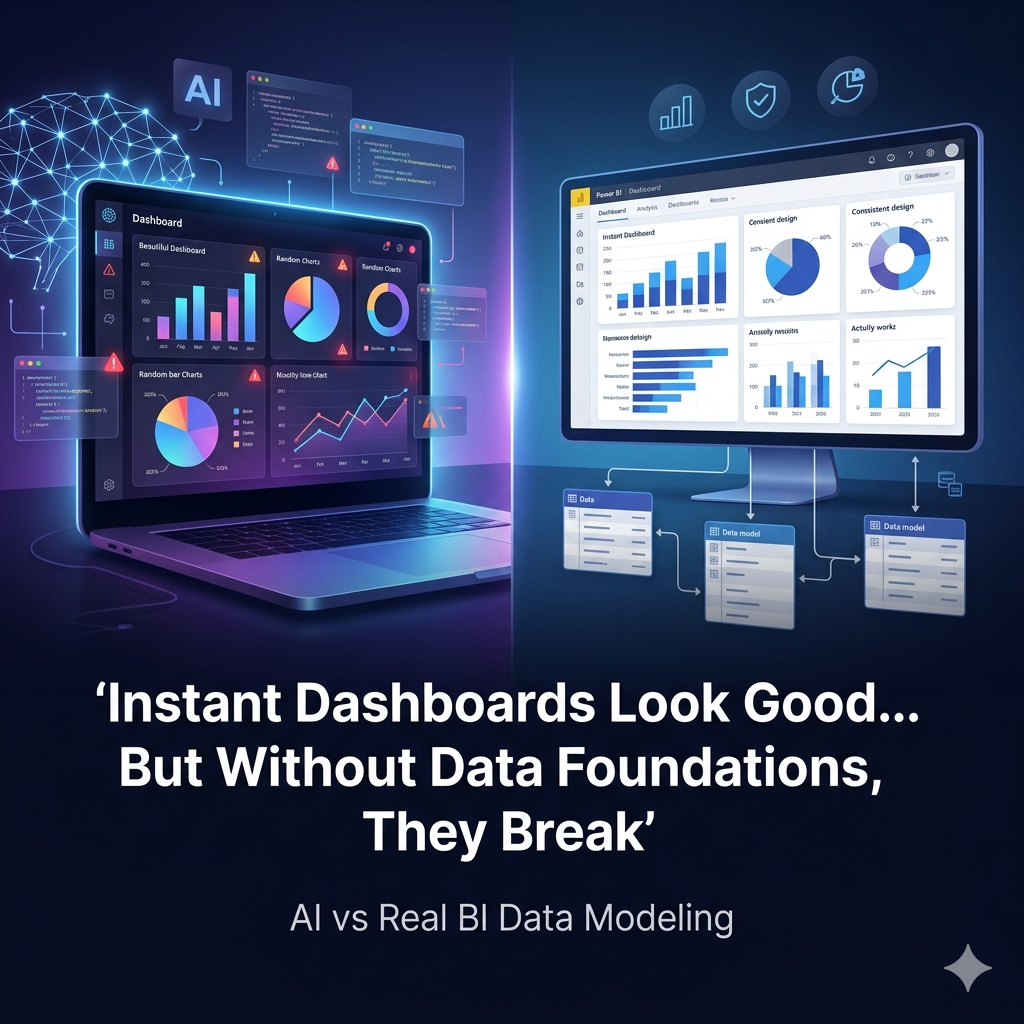
  • Power BI Data Modeling Services vs Vibe Coding: Why Instant Dashboards Fail Without Real Foundations


    You can generate a dashboard in minutes today.

    Just describe what you want, and AI tools will build charts, metrics, and layouts instantly. It feels like a breakthrough for teams chasing speed.

    But here’s the uncomfortable reality: Power BI Data Modeling Services matter more than ever in this new “instant dashboard” era.

    Because speed without structure doesn’t create clarity — it creates confusion at scale.


    The Illusion of Instant Insights

    Vibe coding promises a simple workflow: describe, generate, visualize.

    And yes, it delivers fast results.

    You’ll get:

    • Clean charts
    • Functional queries
    • Visually impressive dashboards

    But what you won’t get is alignment.

    Most businesses already struggle with fragmented systems. CRM data doesn’t match ERP data. Marketing numbers don’t align with finance. Definitions vary across teams.

    AI doesn’t fix this. It simply builds on top of it.

    That’s why companies investing heavily in data analytics services still face the same issue:

    Dashboards look right — but decisions feel wrong.


    Where Instant Dashboards Break Down

    The problem isn’t the tool or the code.

    It’s the assumptions.

    AI-generated dashboards assume:

    • Your data is clean
    • Your metrics are defined
    • Your relationships are correct

    In reality, none of these are guaranteed.

    Without a proper Unified Reporting Data Model, you end up with:

    • Conflicting KPIs
    • Duplicate calculations
    • Misleading trends

    This is where many organizations hit a wall, even after investing in Power BI dashboard development or BI dashboard solutions.

    They built dashboards quickly.

    But they didn’t build them correctly.


    The Missing Layer: Data Modeling

    This is where Power BI changes the game — not because it’s more powerful than AI, but because it forces discipline.

    A strong Power BI data modeling approach defines:

    • What each metric means
    • How tables connect
    • Which numbers are trusted

    With proper Power BI star schema design, your data becomes structured, scalable, and consistent.

    This isn’t flashy work. It’s foundational.

    But it’s also the reason why some companies trust their dashboards — and others don’t.


    Power BI Data Modeling Services for Reliable Insights

    If you want dashboards that actually drive decisions, you need more than visuals.

    You need Power BI Data Modeling Services for Reliable Business Intelligence.

    This approach focuses on:

    • Creating scalable data models
    • Standardizing KPIs across teams
    • Optimizing performance with DAX formula optimization
    • Ensuring consistency across interactive business dashboards

    Instead of building isolated reports, you build a system.

    And that system supports:

    • Executive analytics dashboards
    • Power BI reporting solutions
    • Custom Power BI reports

    Now, every dashboard pulls from the same truth.


    Why AI Alone Isn’t Enough

    AI is excellent at execution.

    It can:

    • Generate queries
    • Suggest visuals
    • Speed up development

    But it cannot define your business logic.

    It won’t know:

    • Which revenue metric finance trusts
    • How customer data should be unified
    • Why one KPI matters more than another

    That’s why even with Power BI automation, you still need strategic input.

    Without it, you’re just automating confusion.


    The Right Way to Combine AI and BI

    The smartest teams aren’t choosing between AI and Power BI.

    They’re combining both — in the right order.

    1. Build your foundation using Power BI consulting services
    2. Define metrics with a Business-Aligned Metrics Framework
    3. Structure data using scalable data models
    4. Then use AI to accelerate dashboard creation

    This approach transforms AI from a shortcut into a multiplier.

    Now you’re not just building dashboards faster.

    You’re building the best Power BI dashboards — faster.


    From Data Chaos to Decision Clarity

    When you invest in proper foundations, everything changes.

    Your dashboards become:

    • Consistent across teams
    • Faster to load and update
    • Easier to trust

    With strong data integration services and cloud data warehouse integration, your data flows seamlessly.

    Add real-time data dashboards powered by real-time data syncing APIs, and decisions happen instantly — not after reports are generated.

    This is where decision-ready data visualization becomes real.


    The Business Impact of Strong Data Foundations

    Without structure:

    • Teams debate numbers
    • Reports get ignored
    • Decisions get delayed

    With proper modeling and strategy:

    • Teams align on metrics
    • Dashboards drive action
    • Decisions happen faster

    This is the difference between:

    • Reporting systems
    • Decision systems

    And that difference directly impacts growth.


    Beyond Dashboards: Building a BI Ecosystem

    Modern BI isn’t just about Power BI.

    It includes:

    • Tableau dashboard design for exploratory analysis
    • Looker Studio marketing reports for campaign tracking
    • Google Analytics 4 visualizations for digital insights

    But regardless of the tool, the foundation remains the same:

    • Clean data
    • Clear definitions
    • Strong modeling

    Without that, every platform fails in the same way.


    The Role of Strategy in BI Success

    Technology doesn’t solve BI problems.

    Strategy does.

    With analytics strategy services and KPI strategy consulting, businesses can:

    • Identify high-impact decisions
    • Prioritize the right metrics
    • Build dashboards that matter

    This is how you move from:

    • Data overload
    • To actionable insights

    And ultimately toward data-driven decision making.


    Why Most Companies Get This Wrong

    Most teams prioritize speed over structure.

    They:

    • Launch dashboards quickly
    • Add more metrics over time
    • Try to fix issues later

    But BI doesn’t work backward.

    Without a foundation, complexity grows.

    That’s why many organizations end up rebuilding everything — after wasting time and budget.


    A Smarter Approach to BI

    Start small.

    Focus on one decision.

    Build a clean model around it.

    Then expand.

    With Power BI integration services, API integration services, and automated data pipeline engineering, you can scale without breaking your system.

    Add data quality anomaly detection, and you ensure accuracy as you grow.

    This is how modern BI systems evolve:

    • Fast
    • Flexible
    • Reliable

    Final Thoughts: Fast Isn’t Enough

    Vibe coding made dashboards faster.

    But it didn’t make them better.

    The real advantage comes from combining:

    • Speed (AI)
    • Structure (data modeling)
    • Strategy (BI roadmap)

    Because in the end:

    A fast dashboard that’s wrong is worse than no dashboard at all.

    If your dashboards look impressive but don’t drive decisions, the issue isn’t your tool.

    It’s your foundation.


    Ready to Build Dashboards That Actually Work?

    At Visualizexpert.com, the focus is simple:

    • Build strong data foundations
    • Create scalable BI systems
    • Deliver dashboards people trust and use

    From enterprise data visualization to interactive dashboard design, the goal is to turn your data into a real decision engine.

    Because success doesn’t come from generating dashboards faster.

    It comes from making better decisions — faster.

  • Why Your Power BI Dashboard Still Gets Ignored


    You built the dashboard.
    The data is clean.
    The visuals look sharp.

    So why is nobody using it?

    That’s the uncomfortable question many teams avoid. Because the problem isn’t Power BI. It’s how dashboards are being designed, positioned, and used inside the business.


    Why Your Power BI Dashboard Still Gets Ignored

    Most dashboards fail long before they’re even launched.

    Not because of poor development — but because they’re built without a clear purpose. Teams focus on creating visually impressive reports instead of solving real decision-making problems.

    This leads to:
    • Too many metrics, no clear priority
    • Overloaded visuals that confuse users
    • Lack of alignment across departments

    Even with strong Power BI Dashboard Development, dashboards often become “nice-to-have” tools instead of business-critical assets.

    And when something doesn’t feel essential, people simply ignore it.


    When Good Data Doesn’t Lead to Action

    A dashboard can be accurate and still be useless.

    Many companies invest in data analytics services and build detailed reports, but those reports only explain what already happened. They don’t guide what to do next.

    That’s where the gap appears.

    Modern BI dashboard solutions should do more than display numbers. They should highlight:
    • What’s changing
    • What needs attention
    • What action to take

    Without that, dashboards become passive. People open them, scroll, and leave — without making decisions.


    The Hidden Cost of Low Adoption

    An ignored dashboard isn’t just a missed opportunity. It’s a business risk.

    When teams don’t rely on dashboards:
    • Decision-making slows down
    • Teams go back to Excel and manual tracking
    • Conflicting reports create confusion
    • Trust in data starts to drop

    Over time, this breaks the entire system.

    Even advanced enterprise data visualization fails if people don’t trust or use it. That’s why strong foundations like a Unified Reporting Data Model and Data Quality Anomaly Detection are critical to ensure consistency and reliability.


    The Real Problem: Dashboards Built for Reporting, Not Decisions

    Most dashboards are built to answer: What happened?

    But businesses need answers to:
    What should we do now?

    This is where most strategies fall apart.

    Without business intelligence consulting or a clear framework, teams build dashboards for completeness — adding more charts, more filters, more data — hoping it will add value.

    It doesn’t.

    Clarity beats complexity every time.


    How to Fix It: Build Dashboards People Actually Use

    The solution isn’t more dashboards. It’s better ones.

    Start with decisions.

    1. Design Around Key Actions

    Identify the top decisions your team makes daily or weekly. Build dashboards that directly support those decisions using custom analytics solutions.

    2. Simplify Everything

    Remove unnecessary visuals. Focus only on metrics that matter. Good data visualization services prioritize clarity over decoration.

    3. Make KPIs Actionable

    Every number should answer a question or trigger a response. This is where KPI dashboard services and structured thinking make a difference.

    4. Enable Exploration

    Static dashboards limit users. With interactive business dashboards, teams can explore data, filter insights, and find answers faster.


    Speed Matters More Than Perfection

    If your data is delayed, your decisions will be too.

    Modern dashboards rely on API Integration Services and Real-time Data Syncing APIs to ensure insights are always current. No more waiting for weekly reports or manual updates.

    Behind the scenes, Automated Data Pipeline Engineering ensures smooth data flow across systems — reducing errors and delays.

    The goal is simple: deliver insights when they’re needed, not after.


    Turning Data Into Decisions

    Data doesn’t create value. Action does.

    To bridge that gap, dashboards must communicate clearly.

    This is where data storytelling services come in. They transform raw numbers into meaningful insights that teams can understand and act on instantly.

    Instead of asking, “What does this mean?”
    Teams start asking, “What should we do next?”

    That’s the shift that drives real impact.


    Building for Adoption, Not Just Delivery

    A dashboard is only successful if people use it.

    To improve adoption:
    • Align dashboards with business goals
    • Ensure consistency across metrics
    • Train teams on how to use insights

    With a strong Business-Aligned Metrics Framework and KPI Strategy Consulting, organizations can create clarity across teams.

    When everyone trusts the data, they rely on it.


    The Outcome: From Ignored Dashboards to Business Impact

    When dashboards are built the right way, everything changes:

    → Faster, more confident decisions
    → Reduced dependency on Excel
    → Higher team alignment
    → Better business performance

    That’s when Power BI consulting services and modern BI strategies truly deliver value.


    Conclusion: It’s Not a Tool Problem

    Your Power BI dashboard isn’t being ignored because it’s broken.

    It’s being ignored because it’s not solving the right problem.

    When you shift your focus from building dashboards to enabling decisions, adoption follows naturally.

    At Visualizexpert.com, the focus is on helping businesses turn underused dashboards into decision-making systems — combining strategy, design, and data to drive real outcomes.

    Because in the end, dashboards don’t matter — 
    Decisions do.

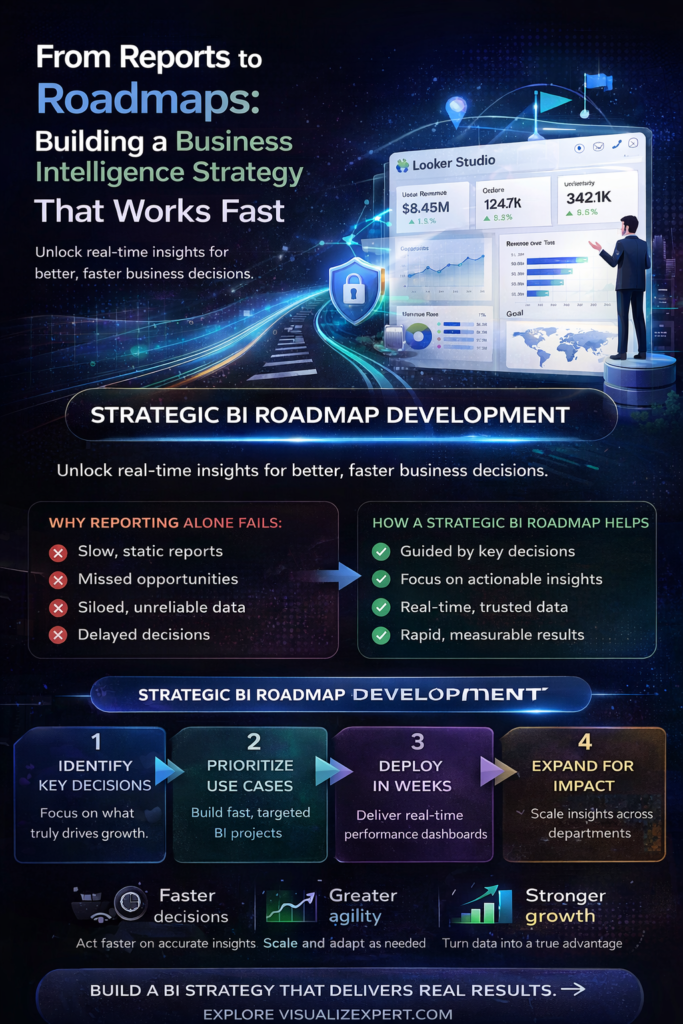
  • Strategic BI Roadmap Development: From Reports to Real Decisions


    You don’t need another dashboard.
     You need decisions that happen before opportunities disappear.

    That’s exactly where Strategic BI Roadmap Development changes the game. Most organizations invest heavily in data analytics services, build impressive dashboards, and still struggle to act fast. The issue isn’t visibility — it’s direction.

    If your reports tell you what happened last month but don’t guide what to do next, your BI strategy isn’t working. And in today’s pace of business, delays don’t just slow you down — they cost you growth.


    Why Most BI Strategies Fail Before Delivering Value

    Most companies approach BI the wrong way. They start with tools, not outcomes. They invest in platforms, not clarity. And they build reports before defining decisions.

    This leads to a familiar situation: dozens of dashboards, endless metrics, and zero alignment.

    Even with strong business intelligence consulting, many teams fall into the trap of building for completeness instead of usefulness. The result? A reporting system that looks advanced but feels disconnected from real business needs.

    The problem isn’t technology. It’s strategy.


    When Reports Don’t Drive Decisions

    A report that doesn’t trigger action is just noise.

    Many organizations rely on static outputs that summarize past performance. These reports may look clean, but they don’t answer the most important question: What should we do next?

    This is where modern BI dashboard solutions and interactive business dashboards should step in — but often don’t. Why? Because they’re built without a clear decision-making framework.

    Without alignment, even the most advanced dashboards fail to deliver decision-ready data visualization. Teams scroll, observe, and move on — without acting.


    The Hidden Cost of Poor Data Foundations

    Data quality is the silent killer of BI strategies.

    When numbers don’t match across reports, trust erodes. Teams start relying on manual workarounds instead of centralized insights. This breaks the entire purpose of enterprise data visualization.

    Strong BI strategies require more than tools — they require structure. A Unified Reporting Data Model ensures consistency across metrics, while Data Quality Anomaly Detection helps identify and fix discrepancies before they impact decisions.

    Without this foundation, even the best dashboards become unreliable.


    Strategic BI Roadmap Development: Building for Speed and Clarity

    A successful BI strategy starts with a simple shift: focus on decisions, not reports.

    Strategic BI Roadmap Development for Faster Decisions

    Instead of building everything at once, start with one critical decision.

    What’s slowing your team down today?
     What decision requires faster clarity?

    This is where Strategic BI Roadmap Development becomes powerful. It prioritizes high-impact use cases and builds solutions around them using custom analytics solutions.

    You don’t need a massive rollout. You need momentum.

    Start small. Deliver fast. Expand intelligently.


    Turning Data Into Actionable Insights

    The goal of BI isn’t data — it’s action.

    Modern strategies focus on delivering real-time data dashboards that align with business priorities. These dashboards don’t just show numbers — they highlight trends, risks, and opportunities instantly.

    With API Integration Services and Real-time Data Syncing APIs, organizations can eliminate delays between data collection and insight delivery.

    This shift transforms reporting into a continuous decision engine.


    The Role of Visualization in Decision-Making

    Visualization isn’t about aesthetics — it’s about clarity.

    Effective data visualization services simplify complexity. They highlight patterns that would otherwise go unnoticed. They eliminate the need for long explanations and enable faster alignment across teams.

    The key lies in interactive dashboard design. Instead of static charts, businesses need dashboards that allow exploration, filtering, and contextual understanding.

    This is where data storytelling services play a critical role — turning raw data into meaningful narratives that guide action.


    Building a BI Strategy Without Enterprise Complexity

    You don’t need massive budgets to build a powerful BI system.

    Modern tools like Power BI and Tableau offer scalable solutions that support Power BI dashboard development and Tableau dashboard design without heavy infrastructure.

    With the right approach, even mid-sized companies can implement executive analytics dashboards that deliver enterprise-level insights.

    The key is not the size of your investment — it’s the clarity of your roadmap.


    From Data Collection to Competitive Advantage

    Data alone doesn’t create value. Speed does.

    Organizations that act faster outperform those that analyze longer. This is why modern BI strategies emphasize data integration services and streamlined pipelines.

    With Automated Data Pipeline Engineering and ETL and ELT Consulting, businesses can ensure that data flows seamlessly across systems, enabling faster insights.

    The goal is simple: reduce the time between data and decision.


    Creating a Data-Driven Culture That Lasts

    A successful BI strategy isn’t just technical — it’s cultural.

    Teams need to trust and use data consistently. This requires alignment through a Business-Aligned Metrics Framework and clear communication of KPIs.

    With KPI Strategy Consulting, organizations can define metrics that truly matter — those tied to revenue, cost, and risk.

    Once teams see the value of data in action, adoption follows naturally.


    Measuring Success: ROI From Modern BI

    The biggest myth in BI? It takes months to see results.

    With the right approach, organizations can deploy solutions quickly and start seeing impact within weeks. Faster reporting, improved accuracy, and better decision-making all contribute to measurable ROI.

    Modern BI strategies focus on ROI-driven reporting solutions that directly impact business outcomes — not just analytics outputs.


    Conclusion: From Reports to Real Business Impact

    The future of BI isn’t about more dashboards — it’s about better decisions.

    A well-defined strategy built on Strategic BI Roadmap Development transforms how organizations operate. It replaces delays with clarity, confusion with alignment, and reports with action.

    At Visualizexpert.com, the focus is simple: help businesses move from scattered reports to structured, decision-driven intelligence systems. By combining modern tools, strong data foundations, and strategic execution, organizations can finally unlock the true value of their data.

    Because in the end, success doesn’t come from seeing more data — 
     It comes from acting on the right insights, at the right time.

  • Data Visualization for API Performance Optimization in Modern BI


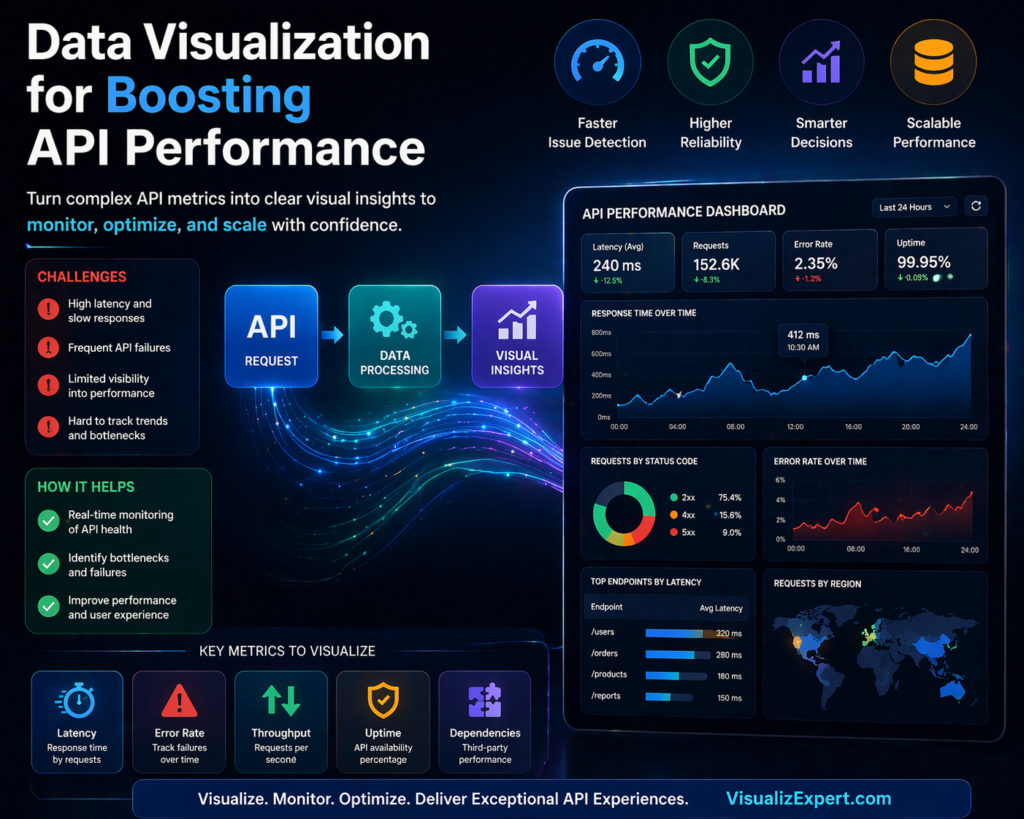
    APIs are the backbone of modern applications, but when they slow down, everything slows down with them. This is where data visualization services play a critical role. Instead of guessing what’s wrong with your APIs, visualization helps you see performance issues in real time and act on them instantly.

    Most businesses today rely heavily on APIs for connecting systems, fetching data, and powering dashboards. Yet, many teams still struggle with performance bottlenecks because they lack visibility into what’s actually happening behind the scenes. Raw logs and backend metrics don’t always tell the full story. Visual insights do.

    When combined with strong API Integration Services, data visualization transforms complex API metrics into actionable intelligence that teams can use to optimize performance, reduce failures, and scale efficiently.


    Why API Performance Issues Go Unnoticed

    API problems rarely start as major failures. They begin as small inefficiencies — slightly higher latency, occasional failed requests, or inconsistent response times. Over time, these issues grow and start affecting dashboards, reports, and decision-making systems.

    Without proper visibility, teams often rely on reactive debugging instead of proactive monitoring. This leads to:

    • Delayed insights across dashboards
    • Inconsistent reporting across teams
    • Increased dependency on engineering for troubleshooting
    • Poor user experience in analytics tools

    This is where interactive business dashboards and real-time data dashboards change the game. Instead of waiting for issues to escalate, teams can monitor API health continuously and act before performance drops.


    How Data Visualization Improves API Performance

    At its core, data visualization simplifies complexity. It converts technical API metrics into visual patterns that anyone — from developers to business leaders — can understand.

    For example, instead of scanning logs, a BI dashboard solution can instantly show:

    • Response time trends over time
    • Error rate spikes
    • API usage patterns
    • Load distribution across systems

    This shift enables faster decision-making and better collaboration between technical and non-technical teams.


    Key API Metrics You Should Visualize

    To truly optimize API performance, you need to focus on the right metrics. Visualization makes these metrics easy to track and interpret.

    • Latency: Visualizing response time helps identify delays caused by network or server processing
    • Error Rates: Tracking failed requests highlights reliability issues
    • Throughput: Shows how many requests your API handles over time
    • Uptime: Helps monitor availability and system reliability
    • Dependency Performance: Tracks third-party service impact

    When these metrics are integrated into enterprise data visualization, teams gain a complete picture of system health without digging into raw data.


    Building Scalable API Monitoring with Data Visualization

    Creating a scalable monitoring system requires more than just charts. It requires a structured approach that combines data pipelines, integration, and visualization.

    First, APIs must be connected through reliable data integration services so that data flows seamlessly into analytics platforms. This ensures that performance metrics are always up to date.

    Next, businesses need automated data pipeline engineering to process and transform API data efficiently. Without automation, monitoring becomes inconsistent and difficult to scale.

    Finally, visualization layers such as Power BI dashboards or Tableau dashboard services bring everything together. These dashboards provide real-time insights that decision-makers can trust.

    This structured approach ensures that API performance monitoring is not just reactive but continuously optimized.


    The Role of Real-Time Data in API Optimization

    Static reports are no longer enough. API performance changes constantly, and businesses need real-time visibility to keep up.

    With real-time data syncing APIs, teams can monitor performance as it happens. This enables:

    • Instant detection of performance drops
    • Faster troubleshooting and resolution
    • Improved system reliability
    • Better user experience

    Real-time insights also enhance decision-ready data visualization, allowing leaders to act on accurate, up-to-date information instead of outdated reports.


    Choosing the Right Visualization Tools

    Not all tools are built the same. The right platform depends on your business needs, data complexity, and scalability goals.

    Many organizations rely on Power BI consulting services to build structured dashboards that integrate seamlessly with Microsoft ecosystems. Others prefer Tableau visual analytics for deeper exploration and storytelling.

    Regardless of the tool, the goal remains the same: turning raw API data into meaningful insights through interactive dashboard design.

    The best setups often combine multiple tools with a strong backend powered by cloud data warehouse integration, ensuring performance and scalability at every level.


    Common Mistakes in API Performance Visualization

    While data visualization is powerful, poor implementation can lead to misleading insights. Some common mistakes include:

    • Overloading dashboards with too many metrics
    • Ignoring data quality and consistency
    • Lack of proper data modeling
    • Delayed data updates due to weak pipelines

    To avoid these issues, businesses should focus on building scalable data models and maintaining a unified reporting data model that ensures consistency across dashboards.


    From Monitoring to Optimization

    Visualization is not just about tracking performance — it’s about improving it.

    Once API performance data is visualized effectively, businesses can:

    • Optimize caching strategies to reduce load
    • Improve server response times
    • Identify bottlenecks in data pipelines
    • Reduce failed request rates

    Over time, this leads to better system efficiency and stronger analytics performance.

    Organizations that invest in analytics strategy services and structured BI systems often see significant improvements in both API reliability and business decision-making.


    How Visualization Drives Better Business Decisions

    API performance doesn’t just impact developers — it affects the entire organization.

    Slow APIs lead to delayed dashboards. Delayed dashboards lead to poor decisions.

    By implementing data visualization for decision making, businesses can ensure that insights are always accurate, timely, and actionable.

    This is especially critical for leadership teams relying on executive analytics dashboards, where even small delays can impact strategic decisions.

    Conclusion

    APIs and data visualization are no longer separate components — they work best when integrated into a unified system. When done right, they give businesses real-time visibility into performance, helping teams identify issues early, optimize faster, and make confident decisions.

    Instead of relying on delayed reports or manual debugging, organizations can leverage visualization to clearly understand API behavior, reduce inefficiencies, and scale analytics with precision.

    With the right combination of data analytics services, API Integration Services, and scalable BI infrastructure, businesses can move from reactive problem-solving to proactive performance optimization.

    If you’re looking to build high-performing, real-time dashboards that turn API data into decision-ready insights, explore tailored solutions at VisualizExpert.com.

    Because in modern BI, it’s not just about data flow — it’s about making that data work for you.


  • Tableau Dashboard Design: Why Trusted Data Matters More Than AI-Generated Charts


    AI can generate charts in seconds.

    But here’s the uncomfortable truth: most businesses are starting to realize:
     Not every chart deserves to be trusted.

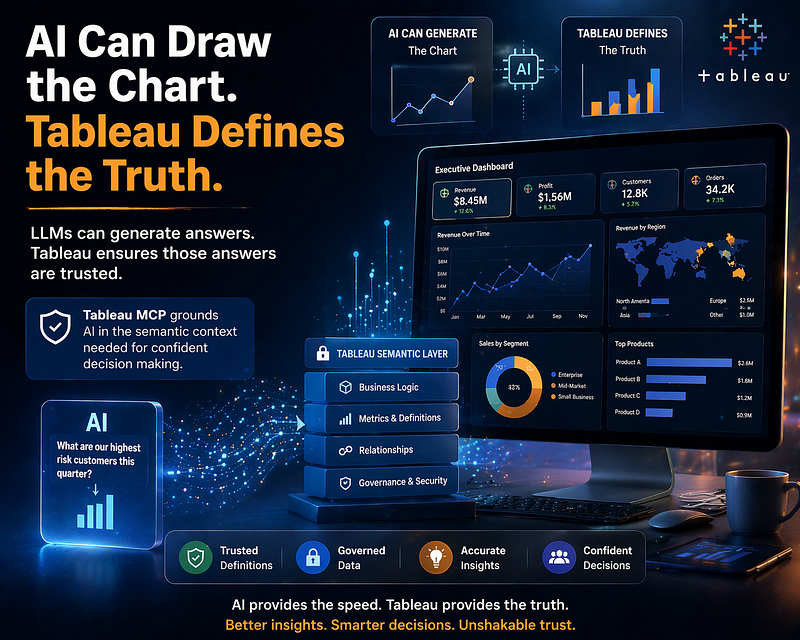
    This is exactly where Tableau dashboard design becomes more important than ever. Because in a world where AI can generate answers instantly, the real advantage is no longer speed — it’s accuracy.

    And accuracy doesn’t come from AI alone.
     It comes from the foundation your data is built on.


    The Shift from “Fast Insights” to “Trusted Insights”

    For years, businesses have invested in data analytics services to make better decisions. The focus was on collecting more data, building dashboards, and improving reporting speed.

    Now, AI has changed the game.

    You can ask a question and get a chart instantly.
     You can generate summaries without writing a single query.

    But here’s the problem:

    AI doesn’t inherently understand your business.

    It doesn’t know:

    • How do you define revenue
    • What qualifies as a high-value customer
    • Which KPIs actually matter

    Without that context, even the most beautiful visualization can be misleading.

    This is why organizations are shifting from just data visualization services to building systems that ensure every insight is grounded in reality.


    Why Tableau Dashboard Design Still Leads in the AI Era

    Tableau has always been more than a visualization tool.

    It’s a system where businesses define how their data should be interpreted.

    Every metric, every calculation, every relationship — 
     It is carefully structured inside a semantic layer.

    This is what makes enterprise data visualization reliable.

    When AI connects to raw data, it guesses.
     When AI connects to Tableau, it understands.

    That’s the difference.

    A well-built Tableau system ensures:

    • Consistent definitions across teams
    • Governed data access and security
    • Reliable, repeatable insights

    This is why companies investing in Tableau dashboard services aren’t just building dashboards — they’re building a source of truth.


    The Role of Business Intelligence Consulting in AI Adoption

    Most businesses are experimenting with AI.

    Very few are preparing their data for it.

    This gap is where business intelligence consulting plays a critical role.

    Because AI without structure creates confusion at scale.

    A proper BI strategy focuses on:

    • Defining business metrics clearly
    • Aligning data models across systems
    • Ensuring governance and consistency

    This is where analytics and reporting consulting becomes essential — not just for building dashboards, but for making AI outputs usable.


    AI + Tableau: From Data to Decision-Ready Insights

    Let’s break this down with a simple example.

    A business asks:
     “What are our highest-risk customers this quarter?”

    An AI model connected directly to raw data might:

    • Pull incomplete signals
    • Misinterpret definitions
    • Generate a visually appealing but incorrect answer

    Now, connect that same AI to a Tableau-backed system.

    Suddenly, it understands:

    • What “high-risk” actually means
    • Which metrics define customer health
    • How different variables interact

    The output changes completely.

    It’s no longer just a chart.
     It’s a decision-ready insight.

    This is the power of combining AI with interactive business dashboards built on strong data foundations.


    Building a System of Understanding, Not Just Reporting

    Most dashboards today are still built for reporting.

    They answer: What happened?

    But modern businesses need more than that.

    They need systems that answer:

    • Why did it happen?
    • What will happen next?
    • What should we do about it?

    This shift requires more than tools.

    It requires:

    • Strong data modeling services
    • A unified reporting data model
    • Clear KPI frameworks

    This is how organizations move toward decision-ready data visualization.


    The Hidden Risk of AI Without Data Governance

    AI makes it easy to generate answers.

    Too easy.

    And that creates a new kind of risk.

    When different teams get different answers to the same question, trust breaks.

    Without governance:

    • Metrics get redefined inconsistently
    • Reports contradict each other
    • Decision-making slows down

    This is why KPI strategy consulting and business-aligned metrics frameworks are becoming critical.

    Because the real challenge isn’t generating insights.

    It’s ensuring everyone is working from the same truth.


    How Visualizexpert Helps Businesses Build Trusted Analytics

    At Visualizexpert, the focus isn’t just on dashboards — it’s on building systems that businesses can rely on.

    This includes:

    • Designing scalable interactive dashboard design frameworks
    • Creating consistent, governed data models
    • Delivering executive analytics dashboards that drive decisions
    • Enabling real-time data dashboards through structured integrations

    The goal is simple:

    Turn data into something teams can trust.

    Because without trust, even the most advanced analytics tools fail.


    The Future: Agentic Analytics Needs a Strong Foundation

    We’re entering an era where AI doesn’t just assist — it acts.

    Agentic analytics systems will:

    • Analyze data automatically
    • Generate insights continuously
    • Recommend actions in real time

    But none of this works without a solid data foundation.

    This is where:

    • Cloud data warehouse integration
    • data pipeline automation
    • scalable data models

    become non-negotiable.

    Because AI is only as reliable as the system it operates on.


    Final Thoughts

    AI can draw the chart.

    But it cannot define the truth behind it.

    That responsibility still belongs to your data systems.

    And that’s why Tableau continues to play a critical role in modern analytics.

    Not as a visualization tool — 
     But as a system of understanding.

    If your organization is exploring AI but struggling with data consistency, it’s time to fix the foundation first.

    Explore how Visualizexpert can help you build trusted, scalable analytics systems at:
     👉 Visualizexpert.com

    Because in the end, it’s not about how fast you get answers.

    It’s about whether you can trust them.

  • Looker Studio Consulting: Fixing Date Range Issues in BigQuery Dashboards for Reliable Insights


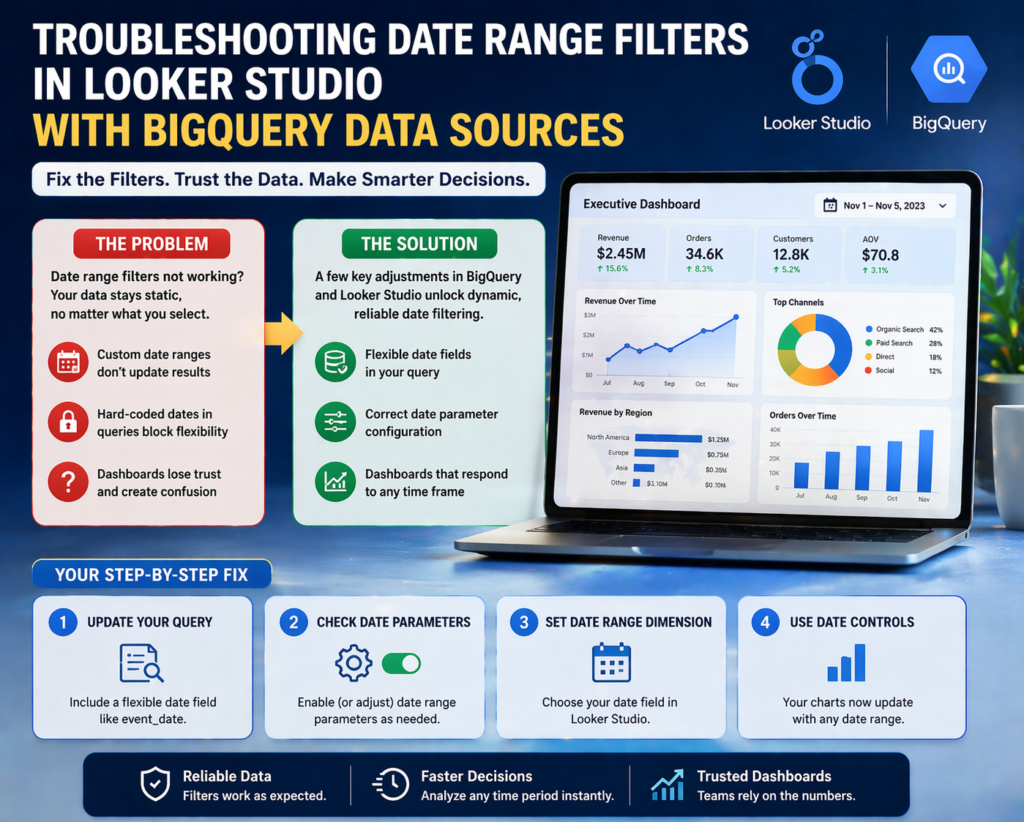
    If you’ve ever opened your dashboard, adjusted the date range… and nothing changed — you’re not alone.

    This is one of the most frustrating issues businesses face when working with BigQuery and Looker Studio. Everything looks perfect on the surface. Clean visuals. Accurate metrics. Smooth design.

    But the moment someone tries to interact with the data, it breaks.

    That’s where Looker Studio consulting becomes more than just technical support — it becomes a business necessity.

    Because when dashboards don’t respond to time filters, it’s not just a technical glitch. It directly impacts how decisions are made.


    Why Date Range Issues Are More Dangerous Than They Look

    At first glance, a broken date filter feels like a small inconvenience.

    But in reality, it creates a chain reaction across teams.

    Marketing teams start questioning campaign performance.
     Sales teams lose clarity on trends.
     Leadership ends up making decisions based on static or outdated data.

    And the worst part?

    Nobody immediately realizes the data isn’t updating.

    This leads to:

    • Misaligned reporting across departments
    • Delayed decision-making
    • Loss of trust in dashboards

    When stakeholders stop trusting dashboards, they go back to manual reports. And that defeats the entire purpose of investing in data visualization.


    The Real Cause Behind Looker Studio Date Filter Failures

    Most people assume the issue is inside Looker Studio.

    It’s not.

    The problem usually starts at the data source level — especially when using BigQuery.

    Here’s what typically goes wrong:

    Your query restricts the date range internally.
     Your dataset doesn’t include a proper dynamic date field.
     Date parameters are either misconfigured or over-engineered.

    So even though Looker Studio offers flexibility on the front end, the backend silently blocks it.

    Think of it like this:

    You’re trying to control time from the dashboard…
     But the query has already locked it.


    How Looker Studio Consulting Solves This Problem

    This is exactly where structured expertise makes the difference.

    Instead of guessing what’s wrong, a proper consulting approach looks at the full data pipeline — from query to visualization.

    Step 1: Fix the Data Foundation

    The first step is ensuring your BigQuery setup allows flexibility.

    A well-structured query includes:

    • A clean, usable date field (like event_date)
    • No hard-coded date restrictions
    • Proper formatting for compatibility with Looker Studio

    This single change often resolves 70% of filter issues.

    Step 2: Configure Date Parameters Correctly

    Many teams either ignore or misuse date parameters.

    When used correctly, they allow dashboards to dynamically adjust based on user input.

    But when misconfigured, they override dashboard controls entirely.

    A consulting-led approach ensures:

    • Parameters align with reporting needs
    • Queries remain flexible, not restrictive
    • Performance doesn’t get compromised

    Looker Studio Consulting for Scalable Dashboard Performance

    Fixing one dashboard is easy.

    Building a system that scales across teams? That’s where most businesses struggle.

    This is why consulting goes beyond just fixing filters.

    It focuses on building a repeatable, reliable system.

    Here’s what that looks like in practice:

    • Clean data models that support multiple dashboards
    • Consistent date logic across all reports
    • Standardized configurations for future scalability

    When done right, your dashboards don’t just work — they stay working.


    What This Means for Business Owners and Teams

    If your dashboards aren’t responding to date filters, you’re not just dealing with a technical issue.

    You’re dealing with:

    Lost opportunities to act on real-time insights
     Slower decision cycles
     Reduced confidence in your analytics

    And in fast-moving environments, delayed insights are as good as wrong insights.

    On the other hand, when your dashboards are fully dynamic:

    You can analyze trends instantly
     You can compare performance across time periods effortlessly
     You can make decisions backed by accurate, real-time data

    That’s the real ROI of fixing something as “small” as a date filter.


    A Simple Way to Think About It

    If your dashboard doesn’t adapt to time…

    It’s not a dashboard.
     It’s a report.

    And reports don’t drive decisions — they just describe the past.

    Modern businesses need systems that respond in real time.

    That’s the difference between data that informs… and data that actually drives growth.


    When Should You Consider Looker Studio Consulting?

    Not every issue requires external help.

    But certain signs indicate you’re past the DIY stage:

    • Your dashboards behave inconsistently across teams
    • Filters don’t work as expected
    • Data from BigQuery feels “stuck” or static
    • You spend more time fixing dashboards than using them

    If that sounds familiar, it’s not a tool problem.

    It’s a structural problem.


    Final Thoughts

    Looker Studio is powerful. BigQuery is powerful.

    But without the right setup, they create friction instead of clarity.

    Fixing date range issues might seem like a small technical win…

    But in reality, it unlocks something much bigger:

    Confidence in your data.

    And when teams trust their data, they move faster, decide better, and scale smarter.

    If you’re dealing with dashboards that don’t respond the way they should, it might be time to look beyond quick fixes.

    Explore how structured Looker Studio consulting can turn your dashboards into reliable, decision-ready systems at Visualizexpert.com

    Because better dashboards don’t just show data — they help you act on it.

  • API Integration Services for Real-Time Data Visualization in Modern BI

    Introduction: The Real Problem Isn’t Data — It’s Delay

    Most businesses today are surrounded by data, yet they struggle to act on it at the right time.

    Sales numbers sit in one system. Marketing insights live somewhere else. Financial data gets updated separately. By the time all of this is compiled into a report, the moment to act has often passed.

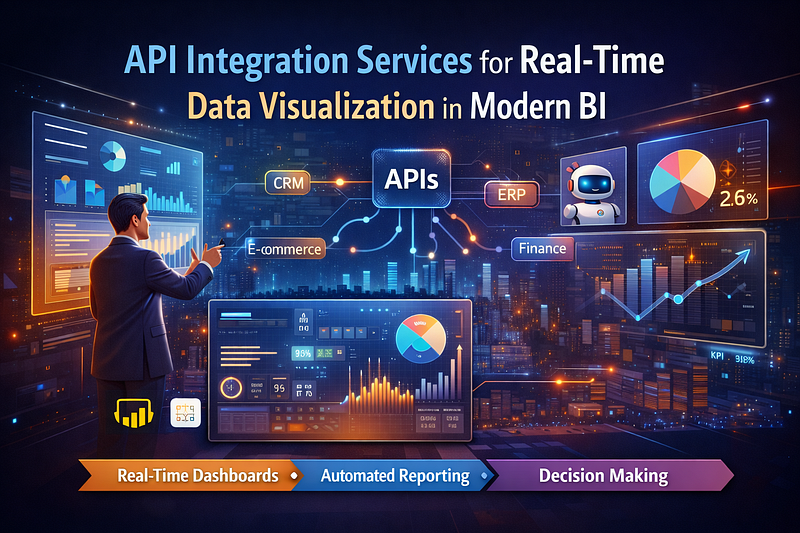
    This is where API Integration Services become critical.

    Instead of manually exporting, cleaning, and combining data, APIs allow systems to communicate with each other in real time. The result is not just faster reporting, but a complete shift toward data visualization for decision making.

    At VisualizExpert, this shift is at the core of how modern analytics systems are built — focused not just on visibility, but on speed and clarity.

    What API Integration Really Means for Business Intelligence

    At its core, API integration is about connection.

    It connects platforms, tools, and data sources so that information flows automatically instead of being handled manually. This eliminates the repetitive work that slows down analytics teams and introduces errors.

    When businesses adopt data integration services, they move away from static reporting and toward systems that update continuously. This is what makes real-time data dashboards possible.

    Instead of asking, “What happened last week?”, decision-makers can now ask, “What’s happening right now?”

    The Shift from Manual Reporting to Intelligent Systems

    Traditional BI workflows were heavily dependent on analysts. Every request required time — time to extract data, clean it, transform it, and finally present it.

    This process was not only slow but also difficult to scale.

    With modern systems powered by automated reporting solutions, much of this process is handled automatically. Data flows through pipelines, updates dashboards, and becomes instantly available to stakeholders.

    The difference is not just efficiency — it’s impact. Businesses no longer wait for insights. They operate with them in real time.

    How Integration Enables Better Decision-Making

    When data is fragmented, decisions become uncertain.

    Different teams rely on different numbers. Reports don’t match. Confidence drops.

    But when systems are connected through APIs, businesses can build a unified reporting data model that ensures consistency across the organization.

    This creates a single source of truth.

    From there, interactive business dashboards transform that data into something usable. Instead of scanning through spreadsheets, users can explore trends, identify issues, and take action immediately.

    This is where data stops being informational and starts becoming operational.

    The Role of Modern Dashboarding Tools

    Once the data is integrated, the next step is presenting it in a way that drives action.

    Tools like Power BI and Tableau have become essential in this process.

    With Power BI Dashboard Development, businesses can create dynamic dashboards that pull data from multiple sources and update automatically. Combined with Power BI data modeling, these dashboards become structured, scalable, and easy to interpret.

    On the other hand, Tableau dashboard services focus heavily on visual storytelling. With interactive Tableau dashboards, users can explore data in a more intuitive way, uncovering insights that static reports would never reveal.

    Both tools, when used strategically, enable organizations to move toward decision-ready data visualization.

    Why Businesses Still Struggle Despite Having Tools

    Many organizations invest in tools but still fail to see results.

    The reason is simple — they focus on tools instead of systems.

    Without a clear strategy, dashboards become cluttered. Metrics become confusing. Teams spend more time interpreting data than acting on it.

    This is where analytics strategy services play a crucial role.

    A well-defined strategy answers key questions:

    • What metrics actually matter?
    • How should data be structured?
    • What decisions should dashboards support?

    Without these answers, even the most advanced tools fail to deliver value.

    Building a Scalable Analytics Ecosystem

    To truly benefit from API integration, businesses need more than just connections — they need a scalable system.

    This involves multiple layers working together seamlessly:

    • Data flows through data pipeline automation, ensuring continuous updates
    • Systems are designed with scalable data models to handle growth
    • Dashboards are built for usability, not just visibility

    When these elements come together, businesses achieve what many aim for but few accomplish — automated BI reporting that actually supports decision-making.

    Real-World Impact Across Business Functions

    The impact of integrated analytics can be seen across departments.

    In marketing, marketing analytics dashboards allow teams to monitor campaign performance and adjust strategies in real time. Instead of waiting for reports, they can optimize continuously.

    In sales, a sales analytics dashboard provides visibility into pipeline health, conversion rates, and revenue trends, helping teams make faster and more informed decisions.

    Operations teams benefit from operations analytics dashboards, where inefficiencies can be identified and resolved before they become larger issues.

    Across all functions, the result is the same — better visibility, faster action, and improved outcomes.

    The Competitive Advantage of Real-Time Data

    In today’s environment, speed is everything.

    Markets shift quickly. Customer behavior changes constantly. Opportunities appear and disappear in moments.

    Businesses that rely on delayed insights are always reacting.

    Those with real-time data dashboards are able to anticipate, adapt, and act.

    This is what creates a true competitive advantage.

    It’s not about having more data. It’s about using it faster and better.

    Why VisualizExpert Focuses on End-to-End Solutions

    At VisualizExpert, the goal is not just to build dashboards.

    It’s to create systems where data flows seamlessly from source to insight to decision.

    This includes:

    • Integrating multiple platforms through APIs
    • Designing structured data models
    • Building intuitive and interactive dashboards
    • Aligning analytics with business goals

    The result is a system that doesn’t just report what happened, but actively supports what should happen next.

    The Future of Business Intelligence

    We are moving toward a future where analytics is not a separate function — it’s embedded into everyday decision-making.

    Data will no longer need to be requested. It will be available instantly.

    Insights will not need to be interpreted manually. They will be presented clearly and contextually.

    Systems will not just display data. They will guide actions.

    This transformation is already underway, and API integration is at the center of it.

    Final Thoughts

    The way businesses use data is changing rapidly.

    Static reports are being replaced by dynamic systems. Manual processes are being replaced by automation. Fragmented data is being replaced by unified ecosystems.

    API integration is what makes all of this possible.

    Without it, data remains disconnected and underutilized.

    With it, businesses gain clarity, speed, and confidence in every decision they make.

    Ready to Build a Smarter Data System?

    If your business is still relying on manual reporting or disconnected dashboards, it’s time to rethink your approach.

    Explore how VisualizExpert.com can help you build real-time, scalable, and decision-driven analytics systems tailored to your needs.

    Turn your data into something that doesn’t just inform — 
     but drives real business growth.