AI in Power BI sounds like a breakthrough — and in many ways, it is. But without the right Power BI Dashboard Development approach, even the smartest AI features end up as unused add-ons.
Most teams don’t struggle because AI is missing.
They struggle because AI is layered on top of dashboards that were never built for decisions.
You might already have dashboards.
You might even be using AI visuals.
But if insights still feel slow, confusing, or unreliable — the issue isn’t the tool.
It’s how everything is structured underneath.
The Illusion of “Smart” Dashboards
AI features in Power BI promise speed:
- Automatic insights
- Pattern detection
- Natural language queries
- Predictive analytics
On paper, it sounds like everything a modern business needs.
And during demos, it works beautifully.
But real-world data isn’t clean or consistent.
So what happens?
- AI highlights the wrong trends
- Insights don’t match business expectations
- Teams lose trust in outputs
- Dashboards get ignored
The problem isn’t that AI is ineffective.
It’s that AI depends entirely on the quality of your data and dashboards.
Why Most AI Features Fail in Practice
AI doesn’t think like your business.
It doesn’t understand:
- What “revenue” actually means in your organization
- Which KPIs matter most
- How different systems define the same metric
- What context decision-makers need
It simply processes what it’s given.
If your data is inconsistent, your AI output will be too.
That’s why many businesses end up in a frustrating loop:
You add AI → Results feel off → You stop trusting it → Adoption drops
And suddenly, a powerful feature becomes just another unused tool.
The Real Role of Power BI Dashboard Development
Good dashboards don’t just display data.
They create clarity.
That’s what strong Power BI Dashboard Development focuses on:
- Structuring data correctly
- Defining clear KPIs
- Aligning metrics across teams
- Designing for decisions, not just visuals
AI works best when these fundamentals are already in place.
Without them, it’s just guessing.
AI Is Only as Good as Your Data Model
This is where most teams underestimate the problem.
Behind every effective dashboard is a solid data model.
If your model has:
- Duplicate fields
- Broken relationships
- Inconsistent definitions
- Poor naming conventions
AI features will amplify the confusion instead of solving it.
For example:
An anomaly detection visual might flag a spike in revenue.
But if “revenue” is defined differently across sources, the insight becomes meaningless.
This is why many dashboards look advanced but fail to deliver value.
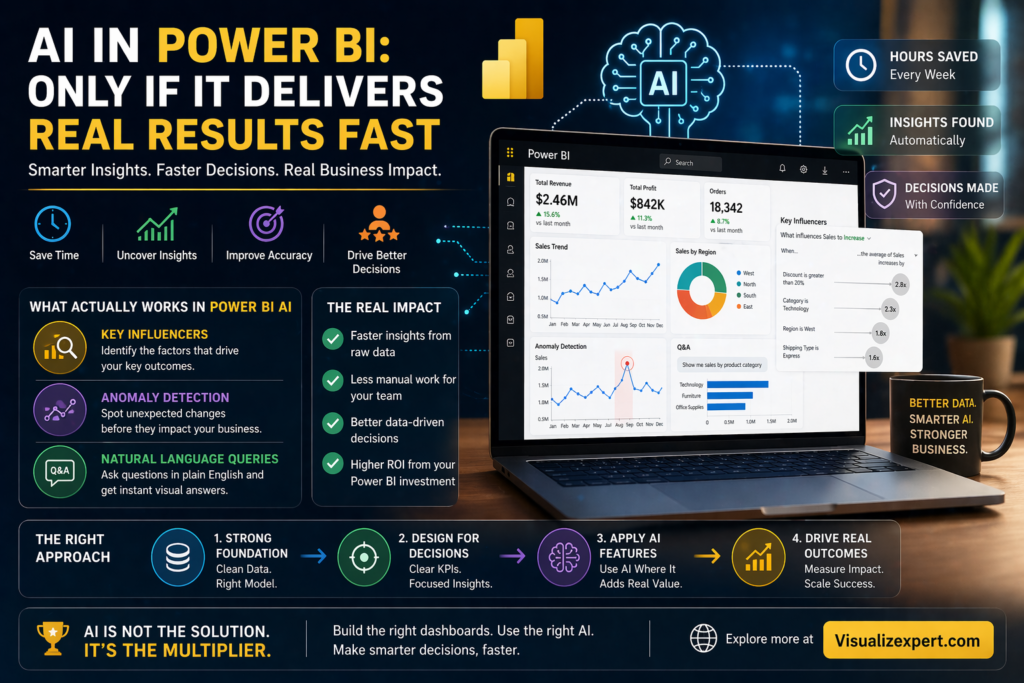
What Actually Works in Power BI AI
Not all AI features are hype.
Some genuinely deliver results — when used correctly.
1. Key Influencers Visual
Identifies what drives outcomes and ranks the most impactful factors automatically.
2. Anomaly Detection
Flags unusual patterns so teams focus on what actually needs attention.
3. Natural Language Queries (Q&A)
Lets users ask questions in plain English and get instant visual answers.
But here’s the catch:
These features only work when your data is structured properly.
Where Businesses Get It Wrong
Most teams approach AI like this:
- Build dashboards quickly
- Add AI features later
- Expect instant transformation
This rarely works.
Because AI is not a shortcut.
It’s an accelerator.
And acceleration only works when direction is already clear.
The Right Approach: Build First, Then Enhance
To make AI actually useful, the order matters.
Step 1: Fix the Foundation
- Clean your data
- Align KPI definitions
- Build a consistent model
- Remove redundancies
Step 2: Design for Decisions
- Focus on key business questions
- Highlight actionable insights
- Reduce visual clutter
Step 3: Add AI Features
- Use AI where it saves time
- Avoid overloading dashboards
- Focus on real use cases
Now AI becomes valuable — not overwhelming.
The Speed Advantage of Doing It Right
When AI is implemented correctly:
- Analysts save hours on manual work
- Business users get faster answers
- Decisions happen quicker
- Reporting cycles shrink
Instead of reacting to data, teams start acting on it.
Final Thought: AI Works Only When Your Foundation Is Strong
AI won’t fix broken dashboards.
It won’t clean messy data.
It won’t define your business logic.
But when everything is structured correctly —
AI becomes a powerful multiplier.
If your dashboards feel complex, slow, or underused, it’s time to fix the foundation first.
👉 Explore how Visualizexpert.com can help you build decision-driven dashboards that actually deliver results.
Leave a Reply